THE CHALLENGE
A legacy ERP on borrowed time
The inherited ERP was stable but aging. New hires could not learn it. Reports required workarounds. Every small change meant a call to a consultant who might return the week after. The product search interface ran to 416 pages. Finding an article meant scrolling, not searching.
The team knew they had twelve to eighteen months before the system became a real liability.
The Odoo quote that stopped the conversation
They did what most mid-market companies do first. They got a quote from the biggest all-in-one on the market. Odoo promised hundreds of turnkey modules, a clean product catalogue, and the reassuring story that everything was already there.
Then came the customization quote. €185,000 HT.
The business ran on Belgian eco-taxes applied per product line. On five pricing tiers driven by markup coefficients across twenty product departments. On a buying group that sends CSV files with up to 60,000 articles per supplier. On construction site addresses distinct from billing addresses. On a purchase pool that aggregates demand across open orders before anyone calls a supplier.
None of that was in the turnkey modules. All of it was in the €185,000. And every future change after go-live would be a new engagement, a new quote, a new wait.
“The platform was all-in-one. Our business was not. The €185,000 was the gap between the two.”
The Mercator trap
The team went looking for a friendlier option and signed with Mercator. The pitch was warm. The reality was not.
Custom modules were scoped loosely. What "done" meant was never pinned down. Deadlines slipped. Every slip came with a new service invoice. The team was paying roughly €500 per week in support fees just to keep the system limping forward. By the time they stopped counting, tens of thousands of euros had been spent. The old system they replaced had actually been faster.
The most telling failure: the team asked for the catalogue to be connected to the buying group's price list so that purchase prices would stay current. They were told a custom import module would cost extra and take weeks. The core promise of an ERP for distribution, accurate and up-to-date pricing, was treated as a premium add-on.
“We were not buying software. We were renting someone else's roadmap. And it did not include us.”
The real question nobody was asking
At this point the team stopped asking "which ERP has the right options?" and started asking a different question.
What if the whole thing was custom from day one, and the platform underneath just handled everything custom equally?
WHY ROOTCX
A platform where customization is the default
RootCX matched what the team had finally understood about their own needs. One shared database, modeled exactly to the business. Not a generic schema with fields turned on and off, but twelve entities and twenty-three relationships that map to how a professional hardware distributor actually operates. Authentication, permissions, audit logs, and encryption included from day one.
Odoo's €185,000 was the cost of bending a turnkey product into a real business. Mercator's weekly invoices were the cost of never quite getting there. On RootCX, there is no turnkey product to bend. Every app is shaped to the business from the start. Customization is not an extra. It is the default.
WHAT THEY BUILT
Four operational workflows, one shared database
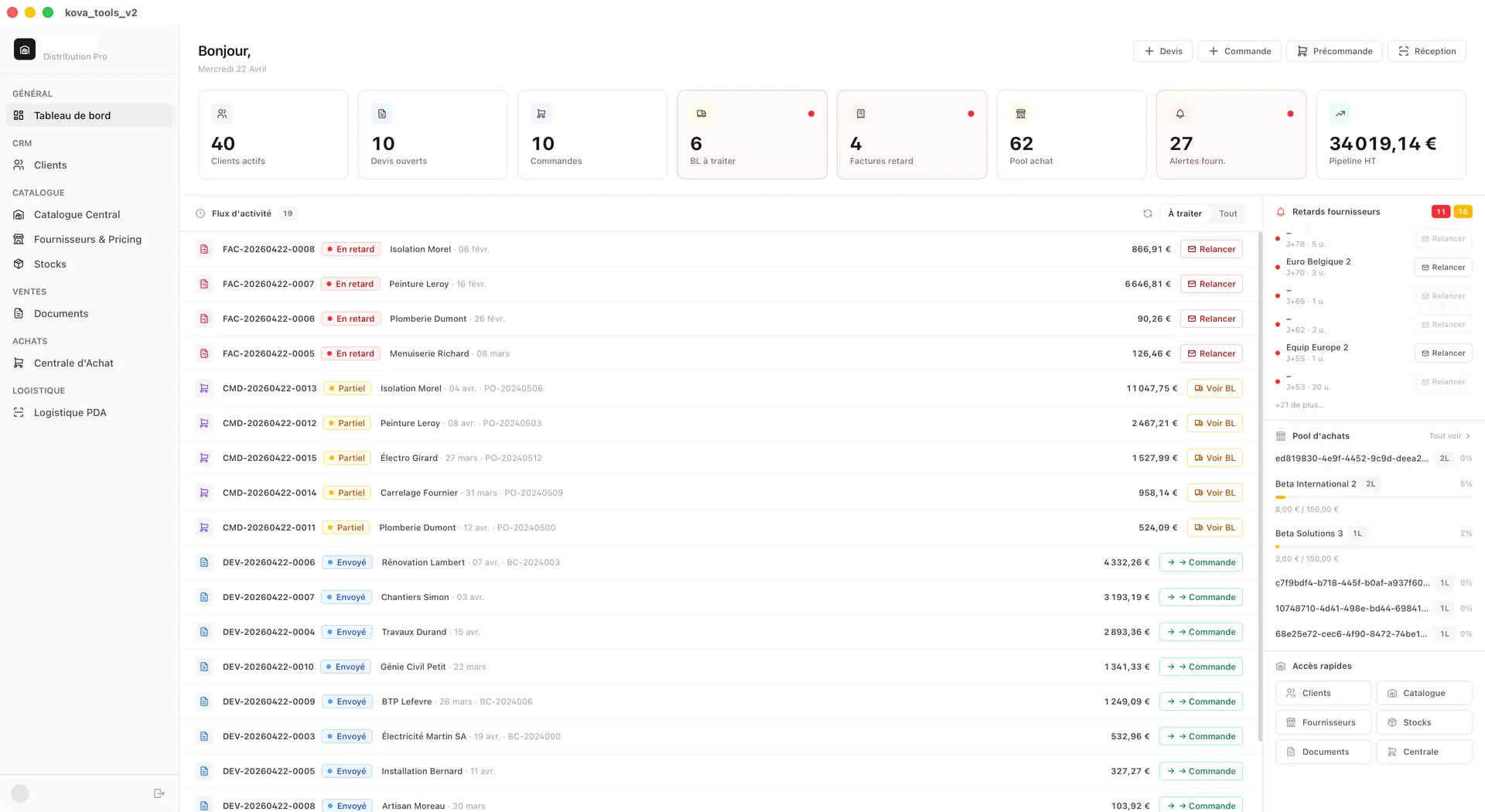
The team rebuilt their entire operation as a single application on RootCX. Not a generic ERP with modules turned on and off, but four tightly connected workflows that mirror how the warehouse runs every day.
Workflow 1: Quote-to-invoice sales cycle
Quote
Auto-pricing + eco-taxes
Client Order
Stock status per line
Delivery Note
Partial delivery support
Invoice
Signature + payment terms
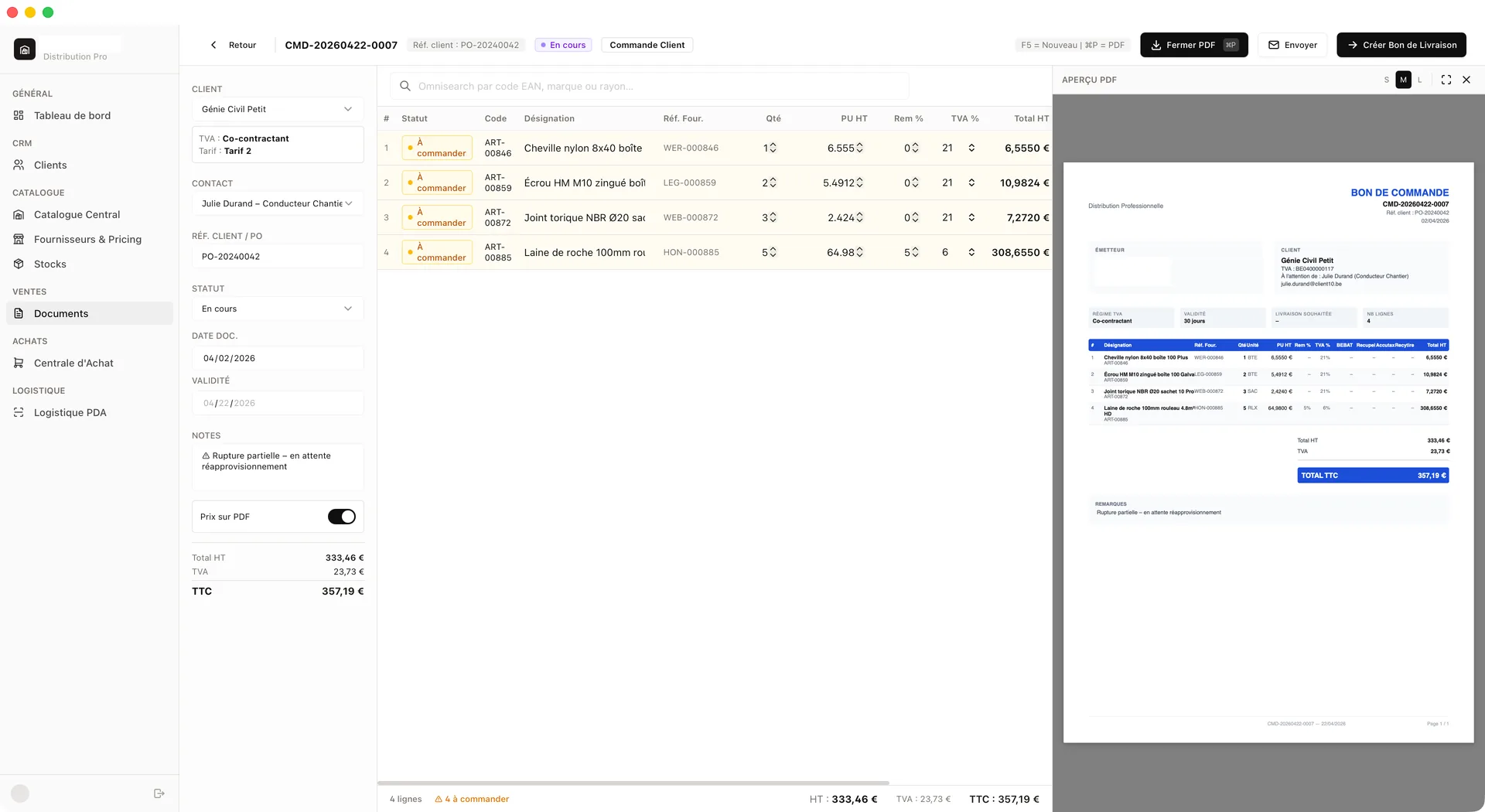
A customer calls to request a quote. The sales rep picks products from the central catalogue via instant search by name, EAN barcode, supplier reference, brand, or department. The system applies the right markup coefficient based on the product department and the customer's pricing tier, adds Belgian eco-taxes per line item, and generates a PDF. The quote is emailed from the app to the right contact: site manager, owner, or accounting, depending on who needs it.
When the client confirms, one click converts the quote into a client order. Every line keeps its pricing and its stock status (green for in stock, yellow for needs ordering, red for out of stock). Yellow lines automatically feed into the purchase pool. Demand flows to purchasing without anyone copying anything.
When the goods are ready, the order converts into a delivery note. Partial deliveries are tracked per line, and the status cascades back to the parent order automatically. The delivery note is signed on-screen at the counter or on a tablet at the client site.
The signed delivery note converts into a client invoice with legally compliant sequential numbering, correct payment terms, and all eco-taxes summed. The full chain is visible at all times: quote, order, delivery note, invoice. Every document links back to its parent.
Workflow 2: Purchase pool and supplier ordering
Purchase Pool
Demand from all orders
Pre-Order
Grouped by supplier
Supplier Order
Confirmed + emailed
This is where the system saves real money. When a sales rep adds an out-of-stock product to a client order, the demand lands in the purchase pool automatically. The pool groups pending demand by supplier across all open orders.
For each supplier, the purchasing manager sees how many lines are waiting, the total purchase amount, and a progress bar toward the free-shipping threshold. When the threshold is reached, one click generates a supplier pre-order with every pending line, the client reference on each row, and a pre-filled email ready to send.
Late supplier orders are flagged with configurable thresholds: a warning at 14 days, an escalation at 42 days, and a one-click email reminder.
The system also surfaces promo opportunities from the buying group. If the demand for a product is close to a bulk discount threshold (buy 10, get 1 free), the dashboard flags it. And here is the margin detail that matters: the client's sale price is always calculated on the standard purchase price, never on the promo price. When the team orders at the discounted rate, the margin increases automatically. The free unit goes into available stock and sells at full markup on the next order.
Workflow 3: Warehouse receiving and cross-docking
Scan EAN
Barcode scanner
Compare
Qty + price vs order
Allocate to orders
FIFO cross-docking
Delivery notes
Auto-created
Surplus → stock
Physical + available
Before
4 manual steps, 2 screens, 1 spreadsheet
After
Scan, review, validate. One operation.
When a supplier delivery arrives, the warehouse staff selects the supplier order and starts scanning EAN barcodes. The interface is built for handheld scanners and tablets: large touch targets, no mouse required. Each scan increments the received quantity.
The system compares received quantities and prices against the original purchase order and flags discrepancies. In distribution, the invoice often comes from the buying group rather than the manufacturer on the purchase order. The system matches on the PO number, regardless of who issues the invoice.
As goods are received, the system allocates quantities to pending client orders from the purchase pool on a first-come, first-served basis. It creates or updates delivery notes and adjusts stock levels in real time. The warehouse staff reviews a cross-docking summary: which client gets what, and how much goes to free stock.
In one operation: receipt recorded, discrepancies flagged, goods allocated, delivery notes generated, inventory updated. On the old system, this was four manual steps, two screens, and a spreadsheet.
Workflow 4: Supplier price list import
Drop CSV
Supplier price list
Map suppliers
Auto-match + manual
Review diff
Price changes highlighted
Confirm import
One-click batch write
Automatic cascade
New purchase prices → markup engine recalculates sale prices across all 5 tiers → next quote reflects updated costs
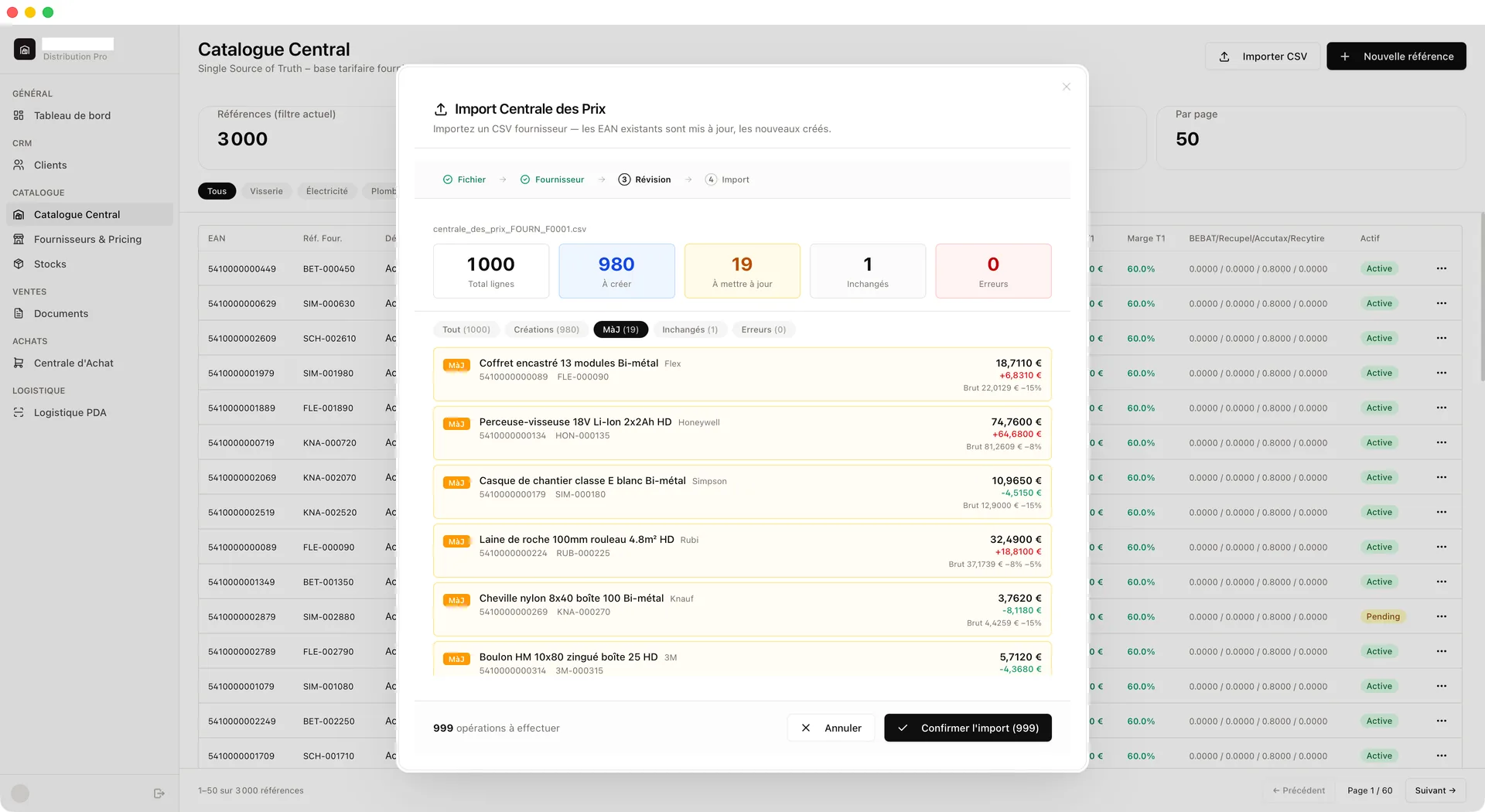
Distribution runs on supplier price lists. The buying group sends updated CSV files regularly, up to 60,000 articles per supplier, with current purchase prices, eco-tax amounts, promo thresholds, and new references. On Mercator, the team was told a custom import module would cost extra. It was the single most frustrating gap.
The system handles this in two layers. The full buying group catalogue is imported into a staging database that stays invisible in the daily ERP. When a warehouse worker scans an unknown EAN at the counter or on a handheld device, the system pulls the article from the staging catalogue and creates the product record on the spot: designation, supplier, price, eco-taxes, brand, unit, all pre-filled. No manual data entry.
For bulk updates on existing references, a four-step pipeline handles the rest. Drop the CSV, the system parses eighteen columns (including three cascading discount rates), maps supplier names, and shows a review screen: new articles to create, price changes highlighted with the exact difference, updated eco-taxes, and unchanged lines. The team reviews, confirms, and the system writes everything in one batch.
The cascade is immediate. Updated purchase prices flow through the markup engine, and sale prices across all five tiers recalculate automatically. A quote created five minutes after the import already reflects the new costs. No spreadsheet. No risk of quoting a client on outdated numbers.
What is not there
No manufacturing, no HR, no project management, no general ledger. Accounting stays in the dedicated accounting software where the bookkeeper and the accountant already work. The ERP pushes structured invoices there, and payment status flows back so the counter staff can see in real time whether a client has paid. Each tool does what it does best.
THE RESULT
One stack, shaped to the business, with nothing to unlearn
€185,000 in Odoo customization fees, avoided. Tens of thousands in Mercator support invoices, stopped.
One system covering what three vendors could not: catalogue, clients, suppliers, documents, stock, logistics, and pricing. All on the same database, with the same permissions, the same audit trail.
Up-to-date pricing for the first time. Every quote reflects the latest supplier costs. The margin protection rule (markup on base price, never on promo price) works without intervention. Promo stock converts to pure margin automatically.
Adaptability at no extra cost. When a new supplier joins the buying group, when the team decides to add e-commerce or electronic invoicing, the change lives where the rest of the business lives. No new module. No new quote. No new vendor.
A team that owns its own stack. The code is theirs. The database is theirs. If they ever wanted to move, they could.
WHAT'S NEXT
Accounting bridge, e-commerce, and electronic invoicing
The next phase connects the ERP to the accounting software with automated invoice push, bank statement reconciliation, and payment status flowing back to the counter in real time. Peppol electronic invoicing is on the roadmap, both outgoing and incoming.
The team is also evaluating an e-commerce layer connected to the same database and pricing engine, so online prices stay consistent with counter prices. The ERP was built to support this from day one: same catalogue, same stock, same markup rules.
AI agents are planned for well-scoped tasks: reconciling buying group invoices against manufacturer purchase orders, surfacing margin drift, and chasing unconfirmed quotes before they go cold. Because agents on RootCX share the same database and permissions as the rest of the app, none of that requires new infrastructure. Only new logic.
“With the previous options, every change was a negotiation. Now it is just a change.”